SLIDE SHOW

  • ElexIdea.Blogspot.Com

    This Blog is Designed Specially for Help and Communicate those Students Who Deserve to Discover Something New !!!

  • Mobile Phone & Computer Stuff

    Mobile Phones section is designed to Post Some cool softwares, Games and as Well as Computer Section is also added to Post More stuff about Computer, Windows, Mac, Linux, etc...

  • Electronics Circuit and Projects

    Electronics Projects and Circuit is the Core of ElexIdea Blog, Here Electronics engineering students can easily Find about latest Projects and Circuits as Well as Component Detail and Their Data Sheet.

  • Movies Gossip, Latest Songs & World News

    Movies and Latest Songs, Here You Can Find Latest Leak Songs First on Web as Well Link of Latest HD movies...

Automatic Room light Controller with Visitor Counter (AT89S52)


This Project Automatic Room Light Controller with Visitor Counter using Microcontroller is a reliable circuit that takes over the task of controlling the room lights as well us counting number of persons/ visitors in the room very accurately. When somebody enters into the room then the counter is incremented by one and the light in the room will be switched ON and when any one leaves the room then the counter is decremented by one. The light will be only switched OFF until all the persons in the room go out. The total number of persons inside the room is also displayed on the seven segment displays.
The microcontroller does the above job. It receives the signals from the sensors, and this signal is operated under the control of software which is stored in ROM. Microcontroller AT89S52 continuously monitor the Infrared Receivers, When any object pass through the IR Receiver's then the IR Rays falling on the receiver's are obstructed , this obstruction is sensed by the Microcontroller


Simple 89S series (Microcontrollers) Programmer using Parallel Port !!

Here is a simple programmer circuit which uses the PC parallel port to burn the 89s series chips.
It can program almost all AT89S series microcontrollers.


Android Apps Huge Collection !!!!

Hey Guys, Today I want you to see some amazing apps and Games in you Android Smartphone. Here I Got a Link where a Huge Collection of Fun for your android is available. 


Over 700 of the most popular games and Apps from Android Market!  
400 Android Games Collection + HD + Emulators [PAID APPS ONLY] 

Android Applications Pack
AdventRush v1.01
Amtalee v1.0.22
Angry Birds v1.4.2 Ad-Free
Armored Defense v1.11
Armored Strike Online v2.066
Backgammon v1.22
Bathroom Reader v1.0.7
Beautiful Widgets v3.23
Blow Up_1.7.5
BowQuest- PandaMania! v1.53
Camel's Kitchen v1.0.2
Chopper Control v1.0
Clockr Evolution (donate) v1.0
Collectorz Movie v1.3


Police siren using Timer IC NE555 !!!!

Description :
Here is the circuit diagram of a police siren based on NE55 timer IC. The circuit uses two NE555 timers ICs and each of them are wired as astable multivibrators.The circuit can be powered from anything between 6 to 15V DC and is fairly loud.By connecting an additional power amplifier at the output you can further increase the loudness.

IC1 is wired as a slow astable multivibrator operating at around 20Hz @ 50% duty cycle and IC2 is wired as fast astable multivibrator operating at around 600Hz.The output of first astable mutivibrator is connected to the control voltage input (pin5) of IC2. This makes the output of IC2 modulated by the output frequency of IC1, giving a siren effect. In simple words, the output frequency of IC2 is controlled by the output of IC1.


Circuit Diagram :


Line Following Robot (MICROCONTROLLER AT89C2051)


Build your Own Line Following Robot !!


This Project Line Following Autonomous Robot is based on 8 bit Microcontroller AT89C2051. This Robot follows the black line which is drawn over the white surface or it follows the white line which is drawn over the black surface. The infrared sensors are used to sense the line. When the infrared signal falls on the white surface, it gets reflected and if it falls on the black surface, it is not reflected this principle is used to scan the Lines for the Robot.


GATE Solved Exam Papers !!!

Take a look at the previous year’s GATE question papers with solved problems. All of them are categorized according to the subject and year. Click on the pdf files to download it.

If These Question Papers were Helpful for you. Then Plz Share it with Your Friends and Hit Like !!!!


Boston Dynamics Developed Dynamic Robots & Its software for Human Simulation !!!!


Boston Dynamics, an engineering company founded by Marc Raibert and his colleagues in the year 1992, have developed dynamic robots and its software for human simulation. Several innovations were made by them college life in Massachusetts Institute of Technology. They excelled in the field of robotics and developed robots that could run and epitomize all basic characteristics of animals.

       Lately, the researchers at the Boston Dynamics lab developed an anthropomorphic robot called Petman. It is a two-legged, upright robot designed to stand and walk like a man. The main aim of the machine is to test chemical warfare clothing for the US army. The robot replicates the same motion of a human being and is able to move at a speed of 3.2 miles/hour.

      Besides the regular motion of the robot, it has also been programmed to demonstrate some basic workout methods like – treadmill walking, push-ups, squats, lunges and some simple calisthenics. From the video below, you can see the robot balancing itself when it is pushed while running on the treadmill. It took almost 15 months for the designers to design this wonderful machine, and 15 more months to build it.


List of Circuit design / analysis / simulation software

Hello friends,
        
        we are bringing you a great collection of circuit simulators – which are at the same time can be used for circuit drawing, circuit design and analysis as well. The list is well structured as free circuit simulation software, open source circuit analysis and simulation software, simple and easy to use simulators, Linux based simulator, windows based simulator etc. Finally after researching through all the list we have compiled a collection best circuit simulation software as well. So lets start our journey right below.

Free and Open source circuit simulator software list:-
 
NgSpiceOne of the popular and widely used free, open source circuit simulator from Sourceforge. NgSpice is developed by a collective effort from its users and its code is based on 3 open source software packages:- known as:- Spice3f5 , Cider and Xspice. Ngspice is a part of gEDA project which is growing every day with suggestions from its users, development from its contributors, fixing bugs and approaching perfection. As its a collaborative project you can suggest improvement of the circuit simulator and be a part of the development team.
 
GnuCap - is another open source project, developed as a general purpose circuit simulator. Known widely as GNU Circuit analysis package, this linux based circuit simulator performs various circuit analysis functions as dc and transient analysis, ac analysis etc. Developers have incorporated spice compatible model for MOSFET, BJT and Diode.

CircuitLogix - this student version software from CircuitLogix enables you to perform analog, digital and mixed mode circuit analysis and simulation.  This SPICE simulation software provides 4000 devices on its student version which is 1/3 of the pro version. This circuit building software give access to switches, linear IC and digital IC, FET, Transistors, relays, displays, signal generators, SCR’s, opto isolators, photo diodes, semiconductors, motors etc.

LTSpice is a widely popular SPICE simulator from Linear. LTspice is a free circuit simulation tool from Linear Technology corporation. This simulation software is considered as one of the best freeware available. Highlight of LTspice is much fast simulation of switching regulators with enhanced SPICE (compared to normal SPICE simulators).LTspice gives access to over 200 op amp models, transistor models, MOSFET models etc. A high disadvantage of LTspice is its proprietary code base which is licensed by Linear Technology. Had they made it open source, LTspice could have gone places with collaborative development.

            Note: LTSpice is considered as the BEST circuit simulation software available by users.

MultiSim is a student version circuit simulation software from National instruments. As you know, student versions always comes with limited access. Still this is a great simulation tool for beginners in electronics. MultiSim, the circuit maker software enables you to capture circuits, create layouts, analyse circuits and simulation. Highlight features include exploring breadboard in 3D before lab assignment submission, create printed circuit boards (PCB) etc. Breadboard simulation is possible with Multisim circuit simulator.

TopSpice - this is a demo version circuit simulator from Penzar. This electronic simulation tool is tailored to work with Windows only and its is compatible for Windows XP/Vista/7.  TopSpice is a mixed mode mixed signal digital,analog, behavioral simulation software. It offers both Pspice and Hspice compatible simulation of circuits.

Circuit Simulator 1.5j - is a freeware circuit simulation tool. I have not used this tool or even attempted a try. I add this as a suggestion from a user in our forum. I think this is just basic tool with very basic functions, created for starter purpose. Use at your own risk.

MacSpice - is a free circuit simulation software for Apple Macintosh users. This circuit simulation which is compatible for PowerPC and Intel architecture Apple Macintosh (MAC pc) computers is derived from Berkeley Spice 3f5 . This breadboard simulator can perform simulation ranging from a single resistor to an integrated circuit with thousands of devices and components packed together.

5Spice is a free analog circuit analysis and simulator with many great features which includes a user expandable library of Spice/Pspice models, save any number of analysis results, integrated graphing of simulation results, student level MOSFET IC design etc. The focus is emphasized on analog circuit analysis and design at component level. 5Spice is mainly designed for students and educators, rather than industry professionals. Latest version of 5spice is released on October 31st 2001 – v 1.65.

Beige Bag - is a demo version of the original paid version of Beige Bag circuit simulation software. Developed based on B2 Spice, this software is mixed mode, power packed, fast and easy to use. Well try the demo version before you decide to buy.

Micro-Cap 10 - is another demo version circuit analyzer and simulator from Spectrum Soft. As they claim its a mixed mode digital/analog circuit simulator with an intuitive user interface, fast simulation and great performance. I haven’t tried this yet, so if you are interested try your own.

PECS - is a free power electronics circuit simulator created by Richard Tymerski. You can download the various manuals and tutorials from the website before start using the simulation tool.

Proteus - Prospice is a mixed mode, Spice based simulation tool from LabCenter. They have two versions, basic and advanced. Basic version is free which supports interactive simulation only while advanced supports a range of useful functions and features like graph based analysis which includes frequency, noise, distortion, fourier parameters etc.

QUCS - Quite Universal Circuit Simulator is a free simulation software developed on GNU/Linux environment. Well this software really works on other operating systems such as Solaris, Apple Macintosh, Microsoft windows, FreeBSD, NetBSD etc. User can simulate large signal, small signal and noise behavior of the circuit using this simple circuit simulator.

Solve Elec - is an electrical circuit simulator (free version) which is developed for Macintosh OS and Windows. It enables users to draw and analyse circuits (both electrical and electronic) functioning in direct current or alternating current, get formulas, verify equations, get equivalent circuits etc.

XSpice - is developed as an extension to Spice 3 by Georgia Institute of Technology. It has code modelling feature which enables user to add new models.
Okay! So far we have listed 16 free version circuit simulators, some of which are open source, some are licensed but free, some are demo/ student versions etc. And we have atleast one simulator for each and every operating system out there in the market. If you know some other free simulation software/tool, that’s so great, please share it as comments.

Now lets have a look at some enterprise circuit modelling software in the market.

Best Licensed/Paid Circuit simulation software: 


PSPICEis a mixed signal, industry standard circuit simulator. This software is used by many professionals for electronic system design and development. Orcad, the printed circuit board (PCB) design software is developed by the same company, Cadence.


MultiSim- is a great simulation software from National Instruments for electronic design engineers, academic professionals and educators, colleges, students, universities and professionals. Highlight features of this software are written above (under free resources).

SiMetrix – is a circuit simulation tool with enhanced Spice specifically developed for Professional electronic design engineers. They have other products like Simplis, Micron VX, DVM etc.

TINA - is an affordable, cost effective circuit design and simulation software, yet very powerful in features and functions. You can buy a basic version of TINA design suite 9.3 for as low as 90 Euros and a classic version (suited for professional design engineers) is available from 600 Euros.
                         This is that Tools Which I am using These Days For Simulation.    

PowerSim – is a simulation software developed for power electronics circuits, motor control and other requirements like dynamic system simulation.


12 volt DC Power Supply from USB Port !!!!

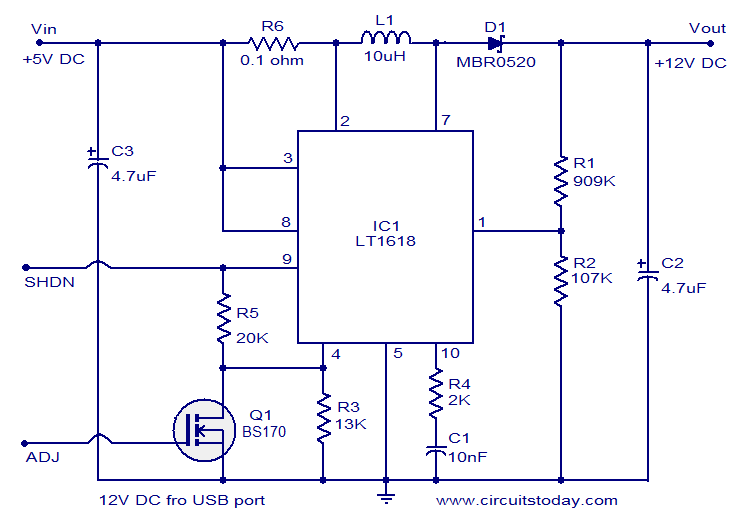
The circuit given below infact is a 5 volt to 12 volt converter. It uses the 5 Volts from USB port and converts it to 12 volts DC with the help of IC LT1618.

 Description : 
  
                                           Using this circuit we can convert 5V DC from the computer USB port to 12V DC and a circuit like this will find a lot of application in USB powered systems. The heart of this circuit is IC LT1618 which is a constant current, constant voltage boost converter. The IC has a wide input voltage range of 1.8 to 18V DC and output voltage can be up to 35V DC.

             In the circuit resistors R1, R2 sets the output voltage. Pin number 9 is the shutdown pin, less than 0.3V to this pin will shut down the IC. Pin number four is the current sense adjust pin. The current sense voltage can be reduced by applying a DC voltage to this pin. If this adjustment is not needed connect this pin to ground and you can omit components R3, R5 and Q1.

Circuit diagram of 12 volts dc power supply: 


  • C2 and C3 must be rated at least 15V.
  • Less than 0.3V at the shutdown pin will shutdown the IC.
  • Output voltage is governed by the following equation R1 = R2 (  (Vout /1.263V) -1).


How to create a secured and locked folder in Windows XP

If you’ve come across this page looking for a way to create a password protected, secure, hidden or locked folder in Windows XP for free, you’ve come to the right place. Unfortunately, Windows XP does not have any user-friendly built-in tools to create secure folders on computers with multiple users. Of course, you can encrypt data on your hard disk, but this only helps if your computer is stolen.

It basically involves using a script to morph the folder into something completely different so that it’s still visible, but nothing inside the folder is accessible. In order to view the data, you have to run another script to morph it back. Anyone who clicks on the folder will be brought to the Control Panel and simply think it is a shortcut.

Here are the steps to create the protected folder in Windows XP: 
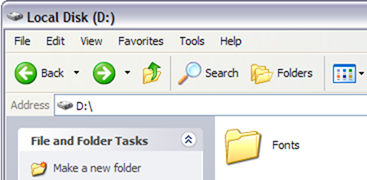
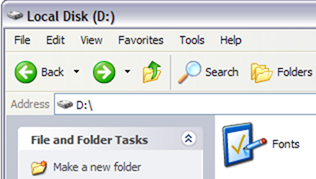
  •  First create a folder that you will use to store your confidential data. For example, I have created a folder called Fonts at the root of my D drive. Since the hidden folder will bring you to the Control Panel, it’s best to name the folder as one of the programs inside there.
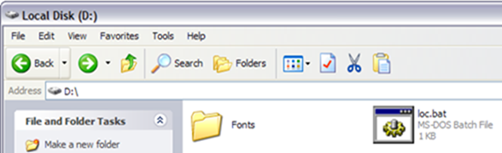
  • In the same location where you created the new folder, create a new file in Notepad, copy the following below into it, replace Fonts with the name of your folder and save it as loc.bat.
                     ren Fonts Fonts.{21EC2020-3AEA-1069-A2DD-08002B30309D}
  • To save the file as a .bat file in Notepad, just put the whole thing in quotes, like “loc.bat” and then click Save.   
  • Now you should have a bat file named loc in the same directory as your Fonts folder, not inside the Fonts folder. 
  • Create another NotePad file and type in the following listed below and save it as “key.bat”.
                 ren Fonts.{21EC2020-3AEA-1069-A2DD-08002B30309D} Fonts
  • Now you’ll have loc.bat and key.bat along with your folder. Go ahead and double-click on loc.bat and your folder will turn into the Control Panel and nothing inside can be viewed. Clicking on it will simply bring you to the Control Panel. You’ll notice the icon should have changed also.  
  • To view the data inside your folder again, click on key.bat and your folder will return to normal! Pretty simple!
Of course, keeping the key.bat file in the same folder will defeat the purpose of securing the folder, so it’s best to move the key.bat file somewhere else, or even better, put it on a USB stick or CD that only you can access.
Most people will be probably look at the folder and simply ignore it since it has the control panel icon and it links directly there. Of course, if someone knows this trick also, they can create their own key.bat file, etc and open it back up. However, if you’re dealing with someone who can do all of that, it’s best you check out more advanced 3rd party software to lock down a folder.

ALTERNATIVE METHOD:

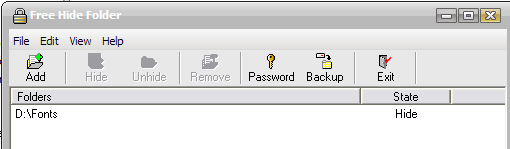
If you’re having trouble with the above-mentioned method (from what I can see from the comments, a good number of people), then here’s another quick and free way to create a secure folder in Windows XP. There is a very nice program called Free Hide Folder from Cleanersoft that allows you to easily hide your private folders.

Your folders are completely hidden and you must supply a password to open the program to unhide the folders. The personal edition is free, just click the Skip Registration button unless you’re using it for commercial purposes.     

I’ve tried this program myself and I cannot access the hidden folder via Windows Explorer nor the command prompt. So if the above method is not working, give this a shot!
Any questions, post a comment! Enjoy!


ShareThis

Related Posts Plugin for WordPress, Blogger...
 
ELEX IDEA BLOG © 2012 | Powered by Blogger